
In today’s fast-paced digital world, solid-state drives (SSDs) have emerged as a game-changer for computing. Unlike traditional hard drives, these devices utilize integrated circuits to store data, offering remarkable speed and efficiency. With no moving parts, SSDs not only enhance performance but also provide greater durability and energy efficiency.
The shift from mechanical disks to flash memory has transformed how we interact with our devices. Users can experience near-instant boot times and rapid application launches, making everyday tasks feel seamless. This innovation is especially crucial for gamers and professionals who rely on quick data access for demanding applications.
As major manufacturers invest heavily in this technology, SSDs have become the standard for both personal and enterprise systems. This article will explore the evolution of storage solutions and why upgrading to an SSD is one of the best decisions you can make for your computer.
Key Takeaways
- SSDs provide faster data access compared to traditional hard drives.
- They enhance performance for gaming and professional workloads.
- Solid-state drives eliminate moving parts, increasing durability.
- Upgrading to an SSD can significantly improve your computer’s responsiveness.
- Major brands are heavily investing in flash-based storage solutions.
Introduction: The Growing Importance of SSD Technology
In the current age of rapid technological advancement, solid-state drives have become essential. These devices are revolutionizing how we store and access data. As we witness a surge in digital content, the demand for faster and more reliable storage solutions is at an all-time high.
According to Gartner, solid-state drives are emerging as the go-to storage platform to support structured data workloads. This growth is fueled by innovation around NAND flash and storage class memory (SCM). They predict that by 2025, over 40% of all on-premises IT storage administration will shift to managed storage as a service.
SSDs come in various form factors and interface types, including SATA, PCIe, and NVMe. Each type offers different levels of performance, catering to a wide range of user needs.
Welcome to the ultimate guide on SSD technology, where we explore why solid-state drives have become indispensable in today’s digital world. Understanding the explosive growth of flash memory adoption across consumer laptops, enterprise servers, and mobile devices is crucial.
Learn how the demand for faster data access and improved system responsiveness has driven SSD innovation forward. Industry analysts predict that solid-state storage will dominate the market in the coming years.
See how the shift from traditional hard drives to SSDs represents one of the most significant technological transitions in computing history. The decreasing cost of NAND flash has made high-performance storage accessible to everyone.
Recognize the role of SSDs in enabling new computing paradigms like cloud storage and edge computing. This guide will take you from SSD basics to advanced selection criteria, helping you understand why upgrading to an SSD is no longer a luxury but a necessity for optimal computer performance.
History and Evolution of SSD Technology
The journey of solid-state drives began in the 1950s, setting the stage for a remarkable evolution in data storage. Early innovations, such as magnetic core memory and Card Capacitor Read-Only Storage (CCROS), paved the way for what we now recognize as SSDs. In 1983, a mobile computer made history by being the first to feature four slots for removable flash-based solid-state disks.
Fast forward to 1991, when SanDisk introduced a 20 MB SSD priced at $1,000. This moment marked the commercial beginning of the industry, highlighting the potential of solid-state drives. By 1995, the introduction of flash-based SSDs eliminated the need for battery-backed memory, revolutionizing how data is stored.
In 2007, PCIe-based SSDs emerged, delivering up to 100,000 IOPS on a single card. This innovation significantly improved performance, allowing for capacities of 320 GB. As technology progressed, later PCIe x8 designs enabled the creation of 1 TB SSDs with impressive read speeds of 712 MB/s and write speeds of 654 MB/s.
Today, SSDs are available in sizes up to 245.76 TB, showcasing an exponential growth in storage capacity. The evolution of solid-state drives is not just about increased size; it also reflects the demands of military and aerospace applications that require shock and vibration resistance.
As SSDs transitioned from expensive niche products to affordable consumer devices, they have become integral to millions of laptops worldwide. Each leap in flash memory density has made these drives faster, larger, and more accessible. This historical context helps explain why today’s NVMe SSDs can achieve speeds that were unimaginable just a decade ago.
| Year | Milestone | Significance |
|---|---|---|
| 1950s | Origins in magnetic core memory | Foundation for modern SSDs |
| 1983 | First mobile computer with SSD slots | Introduced flash-based storage |
| 1991 | SanDisk’s 20 MB SSD | Commercial launch of SSDs |
| 1995 | Introduction of flash-based SSDs | Eliminated battery dependency |
| 2007 | PCIe-based SSDs | High performance with 100,000 IOPS |
| 2025 | SSDs up to 245.76 TB | Massive storage capacity available |
Understanding SSD Technology in Modern Computers
As digital demands grow, understanding the fundamentals of solid-state drives is crucial. A solid-state drive is a type of storage device that uses integrated circuits to store data persistently. It is sometimes referred to as a semiconductor storage device or solid-state disk. SSDs rely on non-volatile memory, typically NAND flash, to store data in memory cells.
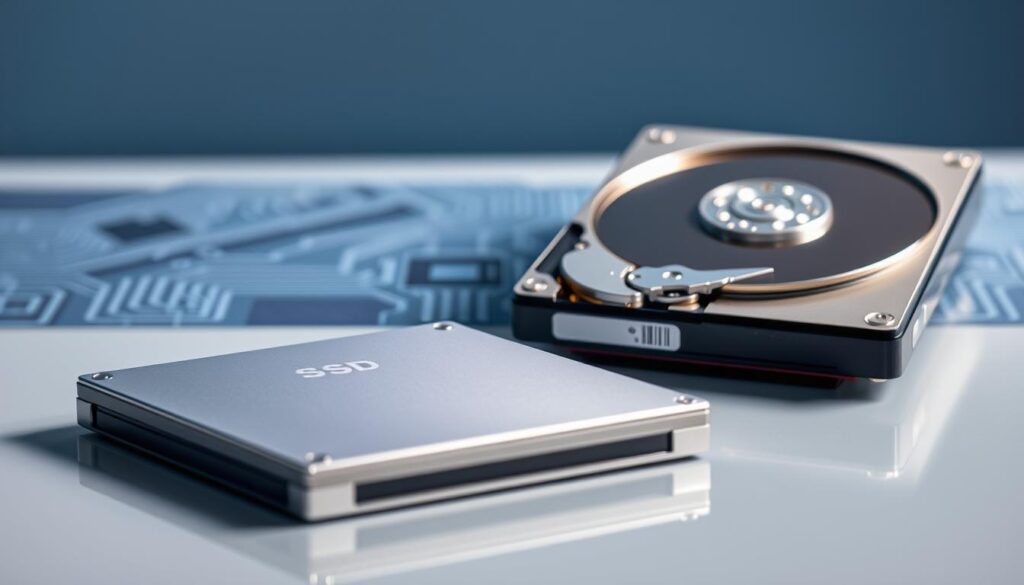
Unlike traditional hard disk drives, SSDs have no moving parts. This design allows them to deliver faster data access speeds and reduced latency. The absence of mechanical components also increases resistance to physical shock, lowers power consumption, and ensures silent operation.
Traditional hard drives focus on rotational latency and seek time, while SSDs do not need to spin or seek to locate data. This means that the performance of SSDs is significantly enhanced. Let’s delve deeper into how SSDs differ from traditional hard drives.
What is SSD Technology?
SSD technology represents a significant advancement in how we store data. The term “solid-state” highlights the lack of moving parts, setting SSDs apart from electromechanical hard drives. SSDs store data in semiconductor cells, with the characteristics of these cells varying based on the number of bits stored.
Another key feature is the concept of non-volatile memory. This allows SSDs to retain your files even when the computer is powered off. Without spinning platters and moving read/write heads, SSDs eliminate the inherent latency found in traditional hard drives.
How SSDs Differ from Traditional Hard Drives
When comparing SSDs to traditional hard drives, the differences are striking. SSDs offer near-instantaneous data access, while mechanical delays from HDD rotational latency and seek time can slow down performance. Moreover, SSDs use standard interfaces like SATA, making them easy drop-in replacements for older storage solutions.
Another advantage is the silent operation of solid-state drives. Unlike the humming and clicking sounds of mechanical disks, SSDs operate quietly, enhancing the overall user experience. They utilize flash memory chips arranged in grids of blocks and pages, controlled by an onboard processor.
In summary, the fundamental differences in data storage technology make SSDs vastly superior for modern computing tasks. Below is a comparison table that outlines these differences:
| Feature | SSDs | Traditional Hard Drives (HDDs) |
|---|---|---|
| Moving Parts | No | Yes |
| Data Access Speed | Fast | Slower |
| Latency | Low | High |
| Durability | High | Lower |
| Noise Level | Silent | Humming/Clicking |
Key Components of SSDs
Understanding the core components of solid-state drives is vital for grasping their impressive performance. The primary elements that define an SSD’s functionality are the flash memory and the controller. Together, they determine how effectively data is stored and accessed.
Flash Memory Explained
Flash memory is the heart of SSDs, using non-volatile floating-gate memory cells to retain data. There are several types of flash memory:
- SLC (Single-Level Cell): Stores one bit per cell, offering high performance and endurance, making it ideal for enterprise applications.
- MLC (Multi-Level Cell): Stores multiple bits per cell, providing a balance between cost and performance, suitable for consumer SSDs.
- TLC (Triple-Level Cell): Stores three bits per cell, maximizing storage density while reducing costs, but with lower endurance.
- QLC (Quad-Level Cell): Stores four bits per cell, further increasing capacity but at the expense of performance and durability.
Each type has its advantages and trade-offs, affecting how well the SSD performs under different workloads.
The Role of the Controller in SSD Performance
The controller is an embedded processor that manages data flow between the flash memory and your computer. It performs critical functions such as:
- Error correction to ensure data integrity.
- Wear leveling to prolong the lifespan of the memory cells.
- Garbage collection to maintain performance over time.
- Encryption to secure your data.
This intelligent management helps maintain speed and reliability, making SSDs a robust choice for various applications.
Cache and Buffering Mechanisms in SSDs
Many SSDs utilize a small amount of DRAM as a cache. This cache temporarily stores data, allowing for faster write operations and efficient data retrieval. Additionally, multiple NAND chips work in parallel, increasing bandwidth and masking latency. This synergy between the memory cells and the controller is what defines the speed and reliability of every solid-state drive.
SSD Form Factors and Interfaces
Navigating the diverse landscape of solid-state drives reveals various form factors and interfaces. Understanding these aspects is essential for selecting the right drive for your needs. Each form factor serves different purposes, and the interfaces determine how data flows between the drive and your system.
Common SSD Form Factors
Solid-state drives come in several popular form factors:
- 2.5-inch: This is the most common size for general computer use. It fits easily into standard laptop bays and is compatible with many systems.
- M.2: Known for its compact design, M.2 is ideal for modern ultrabooks and devices where space is limited.
- mSATA: Utilizing the PCI Express Mini Card layout, mSATA drives are electrically compatible with the mSATA interface specification.
- U.2: This form factor is used in enterprise applications, offering better thermal management and higher density.
- EDSFF: The Enterprise and Datacenter Standard Form Factor (ruler) is designed for high-density storage solutions in data centers.
Interface Types
The interface of an SSD plays a crucial role in its performance. Here are the main types:
- SATA: The legacy SATA interface can achieve speeds of around 500 MB/s, making it suitable for many users.
- PCIe: This interface offers faster data transfer rates compared to SATA, enhancing overall performance.
- NVMe: The cutting-edge NVMe protocol works with PCIe to deliver exceptional speeds, with Gen5 drives reaching up to 15,000 MB/s and Gen6 drives hitting 28 GB/s.
Choosing the right form factor and interface depends on your computer’s motherboard compatibility and your performance needs. Gamers and creative professionals often prefer NVMe M.2 drives for their reduced latency and superior random access performance.
Performance Benefits of SSD Technology
Solid-state drives redefine performance standards in modern computing. Their speed and efficiency are unmatched, offering a range of benefits that enhance user experience.
One of the most notable advantages is the faster data access and reduced latency. SSD random access times typically range from 0.05 to 0.2 milliseconds for consumer NAND drives. In contrast, traditional hard disk drives (HDDs) can take between 2.9 and 12 milliseconds. This means your operating system boots in seconds, applications launch instantly, and files transfer at blazing speeds.
Furthermore, NVMe SSDs achieve the lowest latency figures, making them perfect for demanding tasks like 4K video editing and large database operations. The internal parallelism of SSDs allows them to manage multiple read and write operations simultaneously, dramatically boosting overall throughput.
Another significant benefit is the power efficiency of solid-state drives. They consume about half to a third of the energy required by traditional mechanical drives. This lower power consumption translates to extended battery life in laptops, allowing you to work longer without searching for an outlet.
Moreover, SSDs operate silently, as they have no moving parts. This absence of spinning platters or clicking read/write heads contributes to a more pleasant computing experience. The lack of noise not only enhances your environment but also eliminates vibrations that can affect performance.
In summary, the performance benefits of SSDs make them essential for anyone who values their time and seeks a responsive, efficient computer. Experience the transformative speed of SSD technology and enjoy a smoother, faster computing experience.
Reliability and Endurance of SSD Storage
When it comes to storage solutions, the reliability and endurance of solid-state drives are critical. These drives are designed with several features that enhance their longevity and performance. Understanding these features can help you make informed decisions about your storage needs.
Wear Leveling, Error Correction, and Spare Blocks
Modern SSDs incorporate sophisticated reliability features. One key aspect is wear leveling, which spreads program cycles evenly across NAND cells. This ensures that no single cell wears out prematurely. There are two types of wear leveling:
- Static wear leveling: Moves rarely accessed files to less-used memory blocks.
- Dynamic wear leveling: Distributes new data across free blocks, enhancing endurance.
Error correction code (ECC) technology is another critical feature. It adds extra bits to detect and correct data errors, improving both reliability and drive longevity. Additionally, manufacturers often overprovision SSDs with spare blocks. For instance, a 1 TB drive might actually contain 1.2 TB of NAND flash, allowing for enhanced endurance.
Understanding Lifespan and Data Retention
The endurance of an SSD is typically listed as either DWPD (Drive Writes Per Day) or TBW (Terabytes Written). For example, a Samsung 970 EVO NVMe M.2 SSD with 1 TB capacity has an endurance rating of 600 TBW. This means you can write 600 terabytes before the warranty period ends.
Another important factor is data retention. Heavily used consumer drives may start losing data after one to two years without power. Understanding these ratings helps you gauge how long your SSD will last under your workload.
JEDEC has established standards for SSD reliability metrics, including:
- Unrecoverable Bit Error Ratio (UBER)
- Terabytes Written (TBW)
- Drive Writes Per Day (DWPD)
With these protective technologies, modern SSDs can reliably serve you for many years, making them a smart choice for both personal and professional use.
| Metric | Description | Example |
|---|---|---|
| TBW | Maximum terabytes written | 600 TBW for Samsung 970 EVO |
| DWPD | Drive writes per day | Varies by model |
| UBER | Unrecoverable Bit Error Ratio | Industry standard |
Comparing SSDs to Hard Disk Drives (HDDs)
The choice between solid-state drives and hard disk drives can significantly impact your computing experience. Understanding the differences between these two storage solutions is essential for making informed decisions. This section will explore the key areas of speed, cost, durability, and power consumption to help you choose the right option for your needs.
Speed and Performance Differences
One of the most striking differences between SSDs and HDDs is their speed. Modern NVMe SSDs can reach speeds of up to 15,000 MB/s, while traditional hard drives max out around 300 MB/s. This performance gap is a staggering 50 times faster, making SSDs the clear winner for tasks that require quick data access.
Additionally, consumer SSDs typically offer transfer rates ranging from 500 MB/s (SATA Gen3) to the aforementioned NVMe speeds. In contrast, HDDs generally transfer data at about 100 MB/s to 300 MB/s. This difference can dramatically affect boot times and application launches.
Cost, Storage Capacity, and Value
When it comes to cost, SSDs are more expensive, priced at around $0.05-0.10 per gigabyte for larger models like 4TB and 8TB. In comparison, HDDs are more budget-friendly, costing about $0.01 to $0.03 per gigabyte. However, the performance benefits of SSDs often justify the higher price.
In terms of storage capacity, SSDs now offer sizes up to 245.76 TB, significantly exceeding the 36 TB maximum available for HDDs. This capacity makes SSDs suitable for both personal and enterprise applications, providing ample space for data storage.
Durability, Noise, and Power Consumption
Durability is another area where SSDs excel. With no moving parts, they are more resistant to physical shock and vibration compared to HDDs, which can suffer damage from drops or impacts. This solid-state design enhances the reliability of SSDs, making them ideal for laptops and portable devices.
Moreover, SSDs operate silently, while HDDs generate noise from spinning disks and moving heads. This acoustic comfort can enhance your overall computing experience.
Power consumption is also a critical factor. High-performance SSDs use about half to a third of the energy required by comparable hard drives. This efficiency not only reduces electricity bills but also extends battery life in laptops, allowing for longer usage without needing to recharge.
In summary, while SSDs may have a higher upfront cost, their speed, durability, and energy efficiency often make them a better long-term investment. Below is a comparison table that summarizes these key differences:
| Feature | SSDs | HDDs |
|---|---|---|
| Speed | Up to 15,000 MB/s | Up to 300 MB/s |
| Cost per GB | $0.05 – $0.10 | $0.01 – $0.03 |
| Maximum Capacity | 245.76 TB | 36 TB |
| Durability | High (no moving parts) | Lower (moving parts) |
| Noise Level | Silent | Audible |
| Power Consumption | Low | Higher |
Hybrid Storage Solutions: SSHDs and Dual-Drive Systems
In the quest for optimal storage solutions, hybrid drives offer a compelling alternative. These innovative systems combine the best features of solid-state drives (SSDs) and hard disk drives (HDDs). By leveraging both technologies, users can enjoy enhanced performance without the high costs associated with pure SSDs.
Solid-state hybrid drives (SSHDs) integrate a small amount of flash memory directly onto a conventional hard drive. This intelligent caching allows frequently accessed data to be stored on the faster flash memory, significantly improving access speeds. For users who rely on both speed and capacity, SSHDs present a balanced solution.
One notable example is Apple’s Fusion Drive technology. This system seamlessly combines a separate SSD and HDD into a single logical volume, managed by the operating system. It automatically optimizes performance by storing frequently used files on the SSD while keeping larger files on the HDD.
Intel’s Smart Response Technology, introduced in 2011, also enhances hybrid systems. It allows a SATA SSD to act as a high-speed cache for a larger mechanical drive. This configuration can lead to noticeable performance improvements, especially during boot times and application launches.
Linux users can take advantage of solutions like bcache and dm-cache. These tools enable the creation of custom hybrid storage configurations, allowing for flexible caching policies tailored to individual needs. Users can choose how data is managed between the SSD and HDD, optimizing performance based on their usage patterns.
Hybrid systems automatically store frequently accessed data on the faster flash memory. Meanwhile, bulk files remain on the spinning disk, providing a cost-effective way to achieve near-SSD performance for everyday tasks. This approach is especially beneficial for users who want improved speed without investing in a large-capacity solid-state drive.
Hybrid solutions serve as an excellent stepping stone for those seeking better performance. They offer a practical alternative for users who may not yet be ready to transition fully to SSDs. Furthermore, technologies like Microsoft’s ReadyDrive enhance these systems by storing portions of the hibernation file in hybrid drive cache, enabling faster system resumes.
Ultimately, evaluating whether a hybrid storage solution or dual-drive setup is right for your specific computing needs and budget constraints is essential. These options provide a versatile way to enhance your system’s performance while managing costs effectively.
Enterprise and Embedded Applications of SSDs
Solid-state drives are revolutionizing how enterprises and embedded systems manage data. These drives are designed to meet the demanding needs of high I/O performance, reliability, and energy efficiency. In data centers, enterprise flash drives (EFDs) play a crucial role in mission-critical applications.
In distributed computing environments, SSDs act as a distributed cache layer. This means they temporarily absorb large volumes of user requests directed at slower HDD-based backend storage systems. In supercomputers, this layer is often referred to as a burst buffer, enhancing overall performance.
Many manufacturers are stepping up to provide robust solutions. For instance, Kingston’s Industrial SATA and NVMe SSDs are engineered for durability in challenging environments. They are ideal for applications in robotics, kiosks, surveillance systems, and industrial automation.
Another noteworthy product is the Transcend MTE712A. This high-performance M.2 PCIe Gen4 x4 SSD features hardware-based AES 256-bit encryption. Its industrial-grade reliability includes anti-sulfur components and Corner Bond technology, allowing it to operate in extreme temperatures from -40°C to 85°C.
- Explore how enterprise flash drives deliver exceptional I/O performance and reliability for mission-critical applications in data centers worldwide.
- Understand the role of SSDs as distributed cache layers in supercomputers, where burst buffers absorb massive volumes of user requests with ultra-low latency.
- Discover how industrial-grade SSDs from manufacturers like Kingston and Transcend are built to withstand extreme temperatures, vibration, and harsh environments.
- Learn about the Transcend MTE712A, a self-encrypting NVMe SSD with AES 256-bit encryption and TCG Opal 2.0 compliance for secure enterprise deployments.
- See how industrial SSDs with anti-sulfur components and Corner Bond technology maintain reliability in factories, outdoor kiosks, and surveillance systems.
- Explore embedded applications where Disk-on-Module (DOM) form factors plug directly into motherboards for thin clients and space-constrained systems.
- Understand why wide-temperature SSDs operating from -40°C to 85°C are essential for automotive, aerospace, and outdoor industrial automation.
- Find out how SSDs enable network appliances and firewall hardware by providing reliable, write-protected storage for operating systems and software.
- Recognize the importance of power-loss protection capacitors in enterprise SSDs that ensure data integrity during unexpected power interruptions.
- Appreciate how enterprise SSD adoption continues to grow as organizations modernize their storage infrastructure for AI, machine learning, and big data workloads.
How SSD Technology Impacts Everyday Computing
The impact of solid-state drives on everyday computing is profound and transformative. These drives are not just about speed; they enhance the overall user experience across various devices.
Feel the immediate impact of SSD technology every time you press the power button. Your computer boots to the desktop in seconds rather than minutes. This near-instant start-up time is a game changer for productivity.
Experience how applications like web browsers, photo editors, and office suites launch almost instantly when installed on a solid-state drive. The quick access to data makes your workflow smoother and more efficient.
Enjoy seamless multitasking as your SSD handles multiple simultaneous read and write operations without the slowdowns typical of mechanical drives. This capability allows you to work on several tasks at once without lag.
Discover how SSDs transform the laptop experience with longer battery life, silent operation, and greater durability against bumps and drops. These features make SSDs ideal for portable devices, enhancing their usability.
See how gaming benefits from SSD technology with dramatically reduced level load times and smoother open-world texture streaming. Gamers can enjoy a more immersive experience without frustrating delays.
Understand why content creators rely on high-speed NVMe SSDs for scrubbing through 4K and 8K video timelines without stuttering or dropped frames. This reliability is crucial for professional workflows.
Learn how the compact size of M.2 SSDs enables thinner, lighter ultrabooks and tablets without sacrificing storage performance. This innovation supports the trend toward more portable computing devices.
Appreciate the reliability that SSDs bring to everyday computing, with no mechanical components to fail from regular wear and tear. This durability ensures your data remains safe and accessible.
Find out how SSD technology enhances virtual machines and development environments by providing fast storage for multiple operating systems. This flexibility is essential for developers and IT professionals.
Recognize that upgrading to an SSD is the single most noticeable performance improvement you can make to any aging computer. This upgrade not only boosts speed but also revitalizes your entire system.
Selecting the Right SSD for Your Computer
Choosing the right solid-state drive can significantly enhance your computer’s performance. With various options available, understanding key factors is essential. This guide will help you navigate through the important aspects of selecting an SSD that meets your needs.
Key Factors: Capacity, Speed, Interface, and Budget
When selecting an SSD, consider the following factors:
- Capacity: Determine the storage size you need. Options range from 256 GB for basic use to 4 TB or more for extensive media libraries.
- Speed: Consumer SSDs offer transfer rates between 500 MB/s (SATA Gen3) to 15,000 MB/s (PCIe NVMe Gen5). Faster speeds enhance overall performance.
- Interface: Evaluate interface options carefully. SATA is ideal for budget-friendly upgrades, while PCIe NVMe provides cutting-edge performance.
- Budget: Set a realistic budget. SSD prices currently range from $0.05 to $0.10 per gigabyte for popular 4 TB and 8 TB models.
Consumer vs. Industrial and Enterprise Grade SSDs
Understanding the differences between consumer-grade and industrial-grade SSDs is crucial. Consumer SSDs are designed for everyday use, while industrial SSDs are built for 24/7 operation in harsh environments. Industrial SSDs from brands like Kingston and Transcend support extended temperature ranges and include advanced NAND management for long-term reliability.
Furthermore, check your computer’s motherboard specifications to ensure compatibility with your chosen SSD form factor and interface type. Look for endurance ratings like TBW to gauge how long an SSD will last under your typical workload before considering a replacement.
In summary, making an informed choice about your storage device can greatly impact your daily computing tasks. Compare brands like Samsung, Kingston, SanDisk, and Transcend to find the right balance of performance, reliability, and warranty coverage.
| Factor | Consumer SSDs | Industrial SSDs |
|---|---|---|
| Endurance | Moderate | High |
| Temperature Tolerance | Standard | -40°C to 85°C |
| Reliability Features | Basic | Advanced NAND Management |

The Future of SSD Technology
The horizon of data storage is expanding, and solid-state drives are at the forefront of this evolution. Innovations in this field promise to enhance performance and redefine how we manage data.
One of the most exciting developments is 3D XPoint technology. This breakthrough allows for faster speeds and greater endurance by changing electrical resistance rather than storing electrical charges in cells. Intel’s Optane drives are prime examples of this innovation, demonstrating how flash memory can evolve.
As we look ahead, PCIe Gen5 drives are expected to reach speeds of up to 15 GB/s. Notably, the Micron 9650 is already achieving an astounding 28 GB/s in sequential read speeds. These advancements will significantly impact data-intensive applications.
According to Gartner, by 2025, over 40% of all on-premises IT storage administration will transition to managed storage as a service. This shift highlights the growing reliance on cloud solutions and managed services.
Emerging technologies like CBRAM, Racetrack memory, and NRAM are also on the horizon. These innovations could revolutionize storage solutions, providing faster and more efficient ways to handle data.
Additionally, the increasing layers of NAND flash, with 112-layer and beyond 3D NAND, will continue to drive up capacities while reducing costs per gigabyte. This trend makes solid-state drives more accessible for a broader audience.
Another significant trend is the adoption of NVMe over Fabrics (NVMe-oF). This technology is transforming data center architectures by extending high-performance SSD access across networks, enhancing overall system efficiency.
Moreover, the EDSFF (ruler) form factors are gaining traction in enterprise environments. These designs offer better thermal management and higher storage density, making them ideal for data centers.
As artificial intelligence and machine learning workloads increase, the demand for ultra-fast storage solutions with low latency will only grow. This evolution will push manufacturers to innovate further, ensuring that storage technology keeps pace with computing needs.
Lastly, long-term archival technologies such as 5D optical data storage and DNA digital data storage are being explored. These methods may complement SSDs, providing new avenues for data preservation.
In summary, the future of solid-state drives is bright, with continuous advancements shaping the landscape of data storage. As these technologies evolve, they will enhance performance and redefine our interaction with data.
| Emerging Technology | Description | Potential Impact |
|---|---|---|
| 3D XPoint | Changes electrical resistance for data storage | Faster speeds and higher endurance |
| PCIe Gen5 | Achieves speeds up to 15 GB/s | Enhanced performance for data-intensive applications |
| NVMe-oF | Extends SSD access across networks | Improved data center efficiency |
| 5D Optical Data Storage | Long-term archival technology | Potential for data preservation |
Conclusion
The evolution of storage solutions has led to the rise of solid-state drives as indispensable tools for modern computing. These drives offer remarkable advantages, including blazing speed, rock-solid reliability, and silent operation. With no moving parts, they deliver near-instant boot times and application launches, fundamentally changing the computing experience.
While it’s important to acknowledge the higher cost per gigabyte and finite write endurance, these factors are manageable for most users. Innovations in flash memory continue to push capacities higher and prices lower, making solid-state drives accessible to everyone.
Whether you opt for SATA for affordability or NVMe for maximum performance, upgrading to an SSD is a significant enhancement over traditional hard drives. The knowledge gained from this guide empowers you to select the perfect drive for your needs. Investing in solid-state drives means investing in your productivity and overall computing satisfaction.
Take the next step: evaluate your current storage, choose the right SSD, and experience firsthand why this technology is essential for your computer.
FAQ
What is the main advantage of using SSDs over traditional hard drives?
The primary advantage of solid-state drives is their speed. SSDs provide faster data access and reduced latency, resulting in quicker boot times and improved overall system performance compared to traditional hard drives.
How does flash memory work in SSDs?
Flash memory in SSDs stores data in memory cells. These cells can be of different types, such as SLC, MLC, TLC, and QLC, each offering varying levels of performance and capacity, which influences the drive’s efficiency and lifespan.
What factors should I consider when selecting an SSD?
When choosing an SSD, consider factors like capacity, speed, interface type (such as SATA or NVMe), and your budget. These elements will impact the performance and compatibility with your computer system.
Are SSDs more reliable than hard drives?
Yes, SSDs are generally more reliable than hard drives because they have no moving parts, which reduces the risk of mechanical failure. Additionally, features like wear leveling and error correction enhance their durability.
What is the lifespan of an SSD?
The lifespan of an SSD can vary based on usage and technology, but many modern SSDs are designed to last several years, often exceeding 5 to 10 years, depending on the workload and the quality of the drive.
Can I use an SSD in my laptop?
Absolutely! Many laptops support SSDs, and upgrading to one can significantly improve your laptop’s performance. Be sure to check your laptop’s specifications for compatibility with different SSD form factors.
What are NVMe SSDs, and how do they differ from SATA SSDs?
NVMe SSDs use the PCIe interface, allowing for much higher data transfer speeds compared to SATA SSDs. This results in faster read and write times, making NVMe drives ideal for high-performance computing tasks.
Are SSDs more expensive than hard drives?
Generally, SSDs are more expensive per gigabyte than traditional hard drives. However, their performance benefits often justify the higher cost, especially for users who require speed and efficiency in their computing tasks.